

Finding the Perfect Spot for Your Starlink Dish
New Zealand note: The same roof, pole, wall, eave and ground-mount choices apply for NZ homes, farms, baches, caravans and remote sites. The priority is a clear sky view, secure hardware and cable routing that can handle wind, rain, UV and coastal exposure.
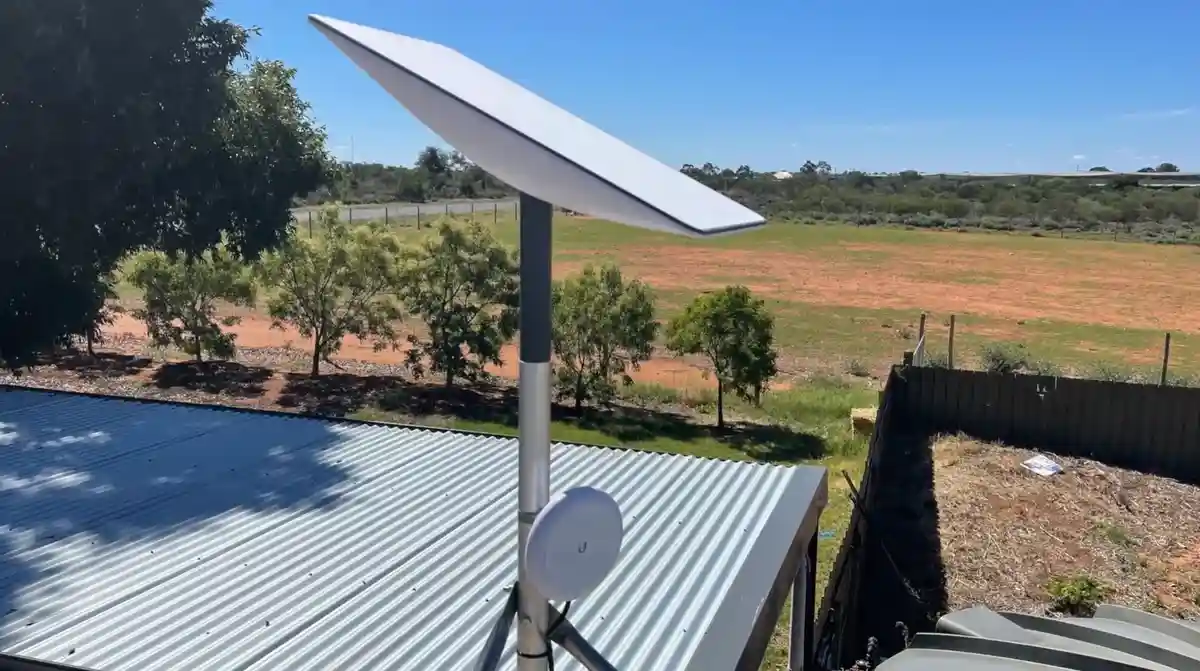
Does Starlink have to be mounted on the roof? No. Your Starlink dish can be mounted on roofs, poles, walls, eaves, ground mounts and even balcony railings, as long as it has a clear, unobstructed view of the sky.
Quick answer:
- Roof mounting is not mandatory
- The key requirement is a clear view of the sky with minimal obstructions, as satellite internet requires a direct line of sight
- Good alternatives include ground poles, exterior walls, eaves, balconies and existing masts
- Use the Starlink app obstruction checker before you drill or mount anything
- Mounting angle must sit within Starlink's supported range (usually 5-40 degrees from vertical, depending on dish model)
- A solid, permanent mount (roof, pole or wall) gives the best reliability and protects the cable
While temporary ground-level setups are useful for initial testing, they are not ideal for long-term use. For permanent installs, an elevated, rigid mount built from durable materials (like aluminium or galvanised steel) will handle Australian wind, rain, heat and coastal conditions much better.
Always start by walking your property and using the Starlink app's obstruction tool. This helps you find a position with minimal tree cover, buildings or roof overhangs in the dish's field of view. Many users in regional New Zealand see fewer dropouts and faster speeds after moving from a temporary ground stand to a higher, fixed mount.
If you need help matching a mount to your dish, our guide on how to choose the right Starlink mount for your roof type in New Zealand is a good starting point.
So, Does Starlink Have to Be Mounted on the Roof?
Starlink does not have to be mounted on the roof, but a roof is often the easiest way to get a clear view of the sky. The goal is simple: give your dish an uninterrupted view so it can track satellites as they move.
Why a Roof Mount Often Works Best
Mounting Starlink on the roof usually delivers more reliable performance because it:
- Maximises sky view - Roofs are often the highest point on your property, lifting the dish above trees, sheds and nearby houses. Fewer obstructions mean fewer dropouts and more consistent speeds.
- Improves signal stability - A rigid, permanently fixed roof mount dramatically reduces movement in strong wind. Users who move from a backyard stand to a roof or high wall mount almost always see steadier latency and better streaming or video call performance.
- Avoids day-to-day obstructions - Ground-level setups are easily blocked by people, pets, vehicles or garden gear. A roof mount keeps the dish out of the way.
- Handles harsh weather better - Quality roof mounts made from corrosion-resistant metals cope well with New Zealand conditions, from coastal salt air to summer heat. They also keep your dish away from standing water or mud.
- Becomes a set-and-forget install - Once you've found a good roof position and secured the mount, you rarely need to touch it again.
If you want to understand when a roof kit is worth it for your place, have a look at our guide on why invest in a Starlink roof mount kit.

What Are the Best Alternatives if You Don't Use the Roof?
When a roof mount isn't ideal or possible, there are several reliable options that still work well with Starlink self-install kits:
- Pole mounts: Great when you need extra height away from the house or to clear trees on rural properties. In-ground pole mounts can be set in concrete for long-term stability. You can also use mast adapters to attach Starlink to an existing TV antenna mast. For a deeper comparison, see our article on roof vs pole mounts for Starlink.
- Wall mounts: A strong option where you have solid external walls and limited roof access. Long and short wall mounts help you clear gutter overhangs and keep the dish away from the roofline.
- Eave mounts: These sit under the eaves and can be less invasive than going directly through roofing materials. They still give decent height while keeping access manageable.
- Balcony railings: Handy for units or townhouses if the balcony faces a clear section of sky. A secure railing mount is essential so the dish doesn't move in high winds.
- Liftd ground mounts: For permanent ground installs, you'll want a taller, rigid ground pole rather than a small, temporary test stand. This keeps the dish above people, pets and garden equipment and makes cable routing easier.
Whatever mount you choose, focus on three things: a clear sky view, solid mechanical strength and weather-resistant materials. If you're regularly on the move with a caravan, 4x4 or RV setup, our guide to Starlink wall, RV and external cable solutions can help you plan a portable but robust install.
How Your Roof Type Changes the Mounting Approach
If you do choose a roof install, your roof material will determine the right hardware and how you waterproof it:
- Metal roofs: Very common across New Zealand and usually ideal for Starlink. Use purpose-built brackets or non-penetrating clamps (for standing seam roofs) to avoid damaging coatings or creating leak points. Avoid makeshift ballast like loose blocks, which can cause corrosion or shift in storms.
- Tile roofs: Need more care. Installers usually lift tiles and fix brackets directly to the roof structure underneath, then re-bed and seal around the fixings. Correct flashing is essential to prevent leaks. For more detail, see our guide to mounting Starlink on a tile roof.
- Shingle roofs: Less common here, but when they do appear, a flashing mount that tucks under the shingles and seals properly is the standard method. Always follow the manufacturer's instructions for proper installation to ensure a watertight seal.
In all cases, use corrosion-resistant fasteners, seal every penetration thoroughly and keep the Starlink cable protected from UV and physical damage. For a broader overview of matching mounts to Australian roof types, refer again to our article on choosing the right Starlink mount for your roof.
Your Complete Starlink Installation Checklist
Installing your Starlink, especially on a roof, requires careful planning and execution. A well-prepared approach ensures safety, optimal performance, and the longevity of your setup.
Tools and Safety: DIY vs. Professional Installation
Before you even think about climbing a ladder, gather your tools and prioritise safety.
Essential Tools List:
- Power Drill: With appropriate bits (e.g., 6mm/1/4 inch drill bit, spade bit for cable routing).
- Screwdrivers/Hex Sockets: To secure mounts and hardware.
- Measuring Tape and Level: For accurate positioning.
- Weatherproof Sealant: High-quality silicone or roofing sealant for all drilled holes.
- UV-resistant Cable Clips or Conduit: For securing cables.
- Marker: For marking drill points.
- Utility Knife and Pry Bar: (Especially for shingle/tile roof work).
- Portable Power Station: In remote areas, a reliable portable power source can be invaluable for powering your tools, ensuring you're not left powerless mid-installation.
Safety Gear:
- Roof-safe Footwear: For traction on slippery surfaces.
- Sturdy Ladder: Securely placed on level ground.
- Safety Harness and Lanyard: Crucial for working at heights, especially on sloped roofs.
- Eye, Hand, and Face Protection: Goggles and gloves, particularly when drilling.
- Spotter: An extra pair of hands and eyes on the ground can make a huge difference.
DIY vs. Professional Installation:
While Starlink kits are designed for self-installation, working on roofs involves inherent risks. If you're uncomfortable with any part of the process - be it working at heights, using power tools, or drilling into your roof - we strongly recommend contacting a professional installer. Improper drilling and sealing can lead to costly water damage, and working at heights carries a significant risk of injury. Professionals have the right equipment, training, and experience to get the job done safely and correctly.
Always avoid drilling into studs, electrical wiring, or water lines. Drill at a slight downward angle from the interior to the exterior, and apply sealant thoroughly to prevent water or bug intrusion. Your safety is paramount. For a more detailed guide on safety, refer to The Ultimate Checklist for Installing Your Starlink Mount Safely.
Cable Routing and Final Checks for a Flawless Setup
Once your Starlink dish is securely mounted, the next critical step is routing the cable safely and effectively into your home. This ensures your connection is robust and protected from the elements.
Cable Routing Options:
- Through Walls: The most common method involves drilling a small hole (ensure it's at a slight downward angle from inside out) through an exterior wall, usually near an eave or soffit. This minimises exposure and provides a clean entry point. Always use a high-quality weatherproof sealant around the entry point.
- Through Eaves/Soffits: If drilling through a wall is undesirable, routing the cable along the eaves or through a soffit vent can be an alternative. This often keeps the cable discreet and protected.
- Using Conduit: For maximum protection against UV degradation, pests, and physical damage, running the Starlink cable through electrical conduit is highly recommended, especially in harsh New Zealand conditions. This also makes future cable replacement easier.
- Over the Roof: While possible, routing the cable directly over the roof should be avoided if possible, as it exposes the cable to more extreme weather and potential damage. If necessary, ensure it's securely fastened and protected.
Waterproofing Entry Points:
Every point where the cable enters your home must be carefully sealed. Use durable, UV-resistant weatherproof sealant around all drilled holes and cable entry points. This prevents moisture ingress, which can lead to costly damage inside your home.
Securing the Cable:
Use UV-resistant cable clips or ties to fasten the cable along its route, whether it's along a wall, under an eave, or inside conduit. Avoid sharp bends in the cable, as this can damage the internal wiring and affect performance. Ensure the cable is neat, tidy, and out of the way of foot traffic or potential snag hazards.
For detailed guidance on protecting your Starlink cable and routing it effectively, see our guide: Plug It In Anywhere: Your Guide to Starlink Wall, RV and External Cable Solutions.
Final Performance Check:
After installation and cable routing are complete, connect the system's router and power supply. Use the Starlink app to confirm your dish is online and free of obstructions. Run a speed test to verify your connection quality. Monitor its performance over the next few days to ensure everything is working flawlessly.
Conclusion: Does Starlink Have to Be Mounted on the Roof?
Starlink does not have to be mounted on the roof, but a well-chosen mounting location is critical. A clear sky view, a solid and weather-resistant mount, and well-protected cabling will do more for your connection than the exact spot you choose.
Whether you end up on the roof, a pole, a wall, an eave or a balcony, focus on:
- Minimal obstructions in the dish's field of view
- Strong, stable mounting hardware built from quality materials
- Good sealing and cable protection for long-term reliability
SpaceTek's Starlink mounts and accessories are designed for New Zealand conditions, with rust-resistant finishes and compatibility with Starlink self-install kits to make setup straightforward and secure.
If you'd like help deciding where to mount your dish or which hardware suits your roof or property, get in touch with the SpaceTek team for expert, local advice.


Leave a comment
This site is protected by hCaptcha and the hCaptcha Privacy Policy and Terms of Service apply.