
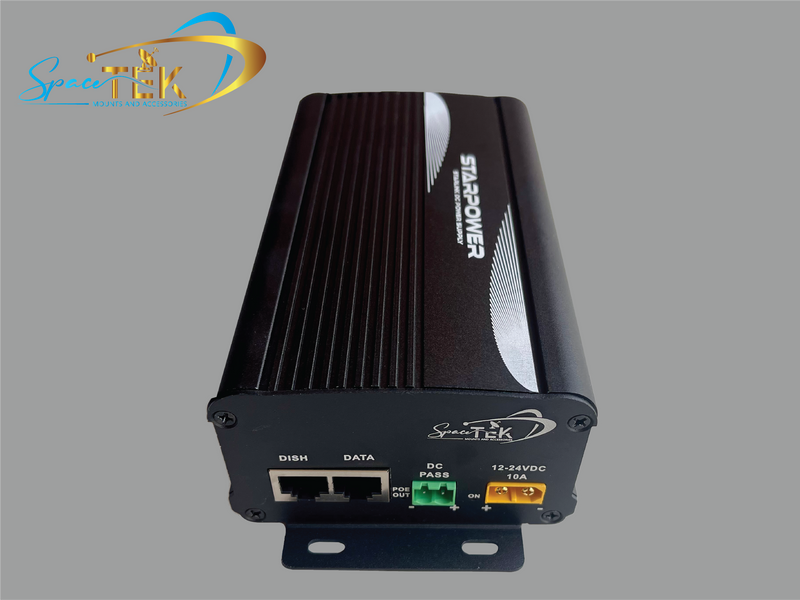
Is StarPower V2 the right 12V or 24V option for your Starlink?

StarPower V2 is a DC power solution for selected Starlink installations where you want to use your own router. It is different from a power supply intended to retain the original Starlink router.
Updated for October 2026, this guide explains the decisions to make before ordering. Confirm the exact terminal, cable arrangement, input supply and router with SpaceTek. A “12V/24V” label alone does not establish that a complete installation is compatible.
Start with the terminal and router arrangement
The first question is whether you want to keep or replace the Starlink router. V2 is intended for a router-replacement arrangement. StarPower V3 serves a different purpose: powering the original Standard Gen 3 / V4 router from DC, with that router still in the system.
Do not treat StarPower version numbers as interchangeable upgrades. Use the supplier's comparison guide alongside the exact product listing, and confirm the configuration before buying.
Model names can be confusing, especially when a terminal generation and a power-product version both contain a number. Send the terminal model or a clear equipment-label photo to the supplier rather than relying on appearance alone. Do not include account passwords or other private credentials.
Compare the complete power setup
A DC arrangement avoids running this equipment through a separate AC inverter. That can reduce conversion and inverter overhead, but it is not a promise of a particular saving or battery runtime.
Compare the whole system, including the terminal, router and any other network equipment. An alternative router also needs a compatible power source. Do not assume that every router accepts battery voltage directly.
For a practical comparison, record normal energy use over a representative period using suitable monitoring equipment. Note the operating conditions and equipment configuration. A brief reading during startup should not be treated as the normal running load.
Battery capacity, usable reserve and other loads all affect how long the setup can run. Have the installation planned for those requirements rather than selecting a supply solely from a claimed efficiency percentage.
What needs checking before installation?
| Item to confirm | Information to provide |
|---|---|
| Terminal | Exact Starlink model and existing cable |
| Power | Battery or DC supply details and intended installation |
| Network | Router to be used and its power requirements |
| Connections | Required adapters and the selected product variant |
| Installation | Protected location, cable route and appropriate technical help |
For Gen 2, the supplier identifies a suitable SPX-to-RJ45 adapter or professionally modified cable as possible connection approaches. Do not cut or reterminate a cable from a generic online pinout. Confirm the exact approved arrangement first.
Use the installation instructions supplied for the actual product. Circuit protection, wiring, polarity and connector selection need to match the complete system. This article does not provide a universal battery-wiring recipe or certify a vehicle's existing circuit.
Get a confirmed configuration before buying parts
Ask SpaceTek to confirm the combination of terminal, supply, cable, adapter and router. If guidance differs between a product page and a general help article, request clarification for the exact setup instead of choosing whichever statement appears to fit.
Also confirm what the selected variant includes. An accessory photograph is not a packing list, and a compatible connector does not mean every other part of the installation is suitable.
Keep a copy of the confirmed equipment list and instructions for future maintenance. This makes a later fault easier to investigate without guessing which components were intended to work together.
Frequently asked questions
Does V2 keep the original Starlink router?
V2 is intended for installations using another router. If you want to retain the original Standard Gen 3 / V4 router on DC, ask about V3 instead and confirm the full setup.
Is a cable adapter always enough?
No. Cable fit is only one requirement. Terminal compatibility, power requirements and network configuration also need to match. Do not infer compatibility from an RJ45 socket alone.
Will it guarantee longer battery runtime?
No fixed saving applies to every installation. Compare measured energy use and include the replacement router and other equipment when assessing the result.
What about warranty and support?
Check the current terms for the terminal and accessories before making changes. Ask the relevant supplier about the proposed configuration or modification; do not rely on a blanket claim that every third-party change either preserves or removes all coverage.
Plan the system, not just the power unit
StarPower V2 may suit a DC installation using your own router when the complete configuration is confirmed. Keep model compatibility, cabling, power and router requirements together in the decision.
Contact SpaceTek with the exact terminal and intended power setup before ordering or modifying cables. A confirmed equipment list is a better starting point than an improvised conversion.

Leave a comment
This site is protected by hCaptcha and the hCaptcha Privacy Policy and Terms of Service apply.