
How Starlink Performs in Bad Weather (The Short Answer)
New Zealand note: For NZ homes, farms, coastal properties, caravans and remote sites, weather reliability is usually about three things: clear sky view, a rigid mount, and protected cabling. Rain fade can happen, but unstable mounting or poor cable routing often causes more ongoing trouble than the weather itself.
%20(16)_compressed.webp?alt=media&token=d40ba8ae-9eb1-4f50-b2e4-93d64fd78f56 "Starlink dish mounted on New Zealand home enduring heavy rain and storm winds")
Does Starlink work in bad weather? Yes — and it handles most conditions far better than people expect.
Here is what you need to know upfront:
- Mild to moderate rain, clouds, and wind: Little to no noticeable impact on speeds or connectivity
- Heavy rain: Temporary speed reductions with occasional short dropouts during intense downpours
- Tropical downpours: Brief outages lasting from a few seconds to a couple of minutes, followed by quick recovery
- Snow and ice: The dish automatically heats itself to melt frozen accumulation
- High winds: Hardware is rated to withstand severe gale-force winds when properly secured
- Thunderstorms and hurricanes: Short interruptions are possible, but users regularly report staying connected through severe events
The key takeaway: Starlink is not completely weatherproof, but it is significantly more weather-resilient than traditional satellite or fixed-line internet in remote areas. Most disruptions are brief and recover automatically.
For New Zealands in rural and regional areas — dealing with everything from tropical wet seasons to coastal storm systems — that distinction matters enormously.
Where things can go wrong is not usually the dish itself. It is the mounting setup underneath it. A poorly secured dish that shifts in strong wind loses signal alignment fast. That is where installation quality becomes the real factor separating reliable service from frustrating dropouts.
Does Starlink Work in Heavy Rain, Snow, Thunderstorms and Hurricanes?
Starlink continues to operate during heavy rain, snow, thunderstorms, and high-wind events, though severe atmospheric conditions can cause temporary signal degradation. The hardware is designed to withstand extreme environments, but physical alignment and signal path interference are the main variables that dictate your actual performance during a storm.
Understanding how different weather types affect your connection helps you plan for the worst of the New Zealand seasons. Let us look at how the system handles specific weather challenges. For a broader look at global meteorological impacts, you can read more about Does Starlink Work in Bad Weather? Rain, Snow and Wind on The-Weather.com.
Heavy Rain and Storm Systems
Heavy rain impacts Starlink by physically scattering and absorbing the microwave signals passing between your dish and the satellites overhead. This phenomenon is known as rain fade, and it is the most common cause of weather-related slowdowns.
During standard light rain or drizzle, you will rarely notice any difference in your browsing or streaming speeds. However, when a heavy downpour hits, the performance dynamics change:
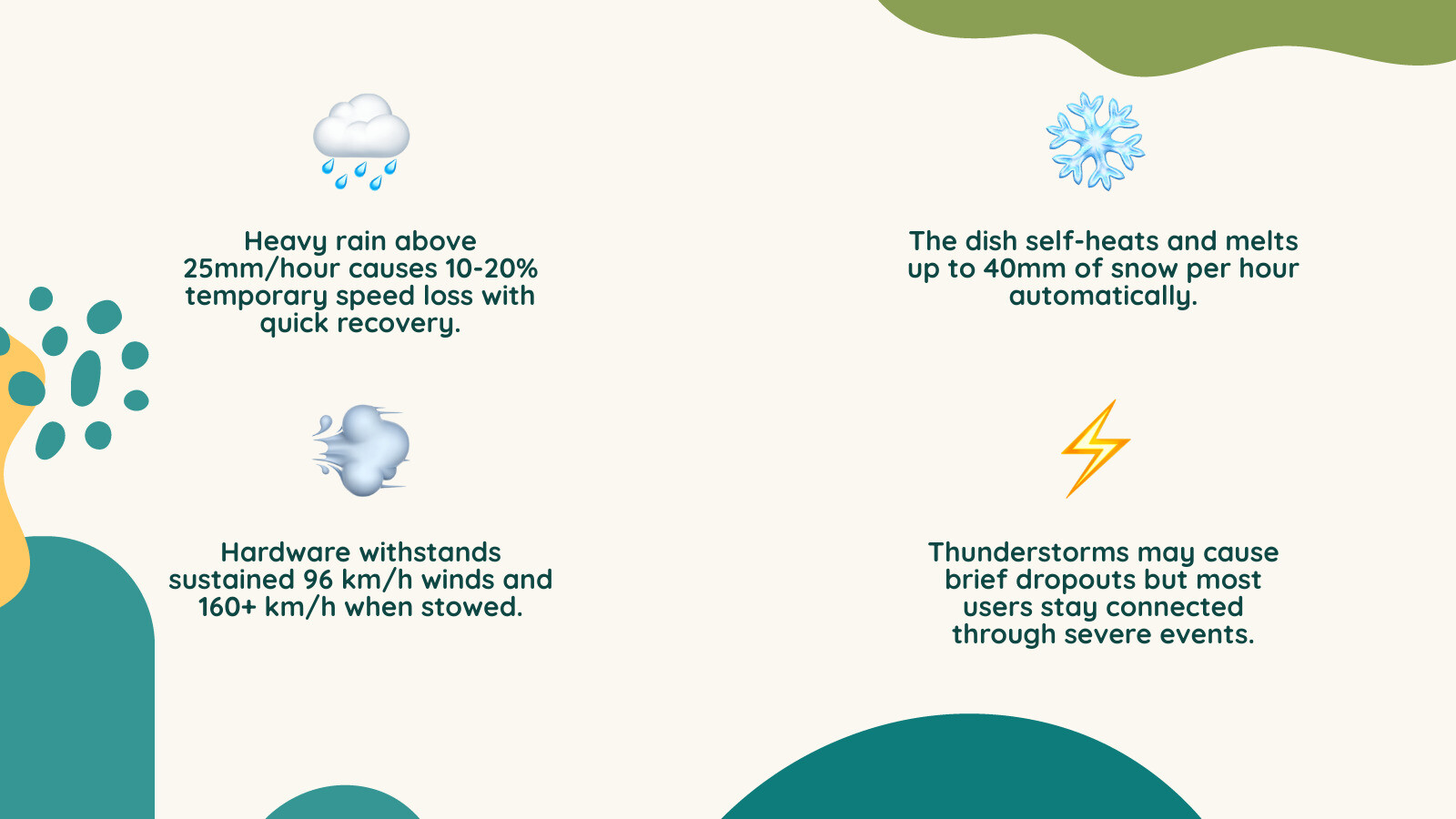
- Moderate rain: Typically results in a minor loss of peak download speed, which is barely noticeable during daily use.
- Heavy rain: Can cause a more noticeable speed loss, occasionally accompanied by a few brief handoff dropouts as the dish switches between satellites.
- Extreme tropical downpours: Can cause brief, full outages lasting from a few seconds to a couple of minutes.
While these disruptions might sound concerning, the system is designed to recover almost instantly once the heaviest band of the storm passes. You can read more about how water droplets interact with satellite signals in our detailed guide on Does Starlink Work on Rainy Days.
Snow and Ice Conditions
Starlink handles snow and ice exceptionally well thanks to an integrated, automatic heating element built directly into the dish. The system detects cold temperatures and increases its power draw to melt frozen accumulation on the face of the receiver.
While snow is not a major concern for most coastal New Zealands, regional alpine areas and cold southern tableland winter mornings present unique challenges. Here is how the hardware manages freezing weather:
- Snow melting capacity: The system can melt standing snow steadily to keep the face clear.
- Power consumption impact: When the snow-melt heater activates, the dish increases its power draw significantly compared to its standard idle power consumption.
- Physical accumulation: While the face of the dish clears itself, heavy snow piling up around the base of the mount can still block the dish's field of view, requiring manual clearing.
If you live in or travel through alpine regions, preparing your hardware is key. We have put together a comprehensive checklist on Preparing Your Starlink System for Winter Weather to help you keep your connection active when the temperature drops.
Thunderstorms
Thunderstorms do not block Starlink signals entirely, but the combination of dense, moisture-heavy clouds, active lightning, and rapid atmospheric changes can cause temporary signal instability. You may experience brief latency spikes or short packet-loss events during an active electrical storm.
Lightning itself does not directly interfere with the radio frequencies used by the system, but a direct strike on or near your home can destroy your hardware. Because the dish is mounted high on your roof, it acts as a natural lightning rod. Using a high-quality surge protector and ensuring your mount is properly grounded are essential steps to prevent catastrophic electrical damage during summer storm seasons.
Hurricanes and High-Wind Events
Starlink hardware is engineered to survive severe windstorms, but the physical stability of your installation mount is the ultimate deciding factor. If your mount flexes, wobbles, or vibrates in the wind, the dish will lose its precise alignment with the satellites, leading to immediate dropouts.
The standard Gen 3 Standard dish is rated to operate in sustained winds and can withstand extreme forces when stowed flat. While the electronics are built to survive these forces, extreme winds can throw debris at the dish, causing physical damage. In catastrophic storm events like cyclones, we always recommend stowing the dish via the app and bringing the hardware indoors to protect your investment.
Why Starlink Is Still More Reliable Than Traditional Internet in Bad Weather
Starlink is inherently more reliable than traditional satellite and fixed-line internet during bad weather because it relies on a low-Earth orbit (LEO) constellation rather than a single geostationary satellite. This structural difference gives the system multiple redundant signal pathways to bypass localised storm cells.
Traditional satellite internet providers rely on massive satellites parked in geostationary orbit high above the Earth. Because the satellite is in a fixed position, your dish must point at one exact spot in the sky. If a heavy storm cloud sits directly between your dish and that single satellite, your internet goes down and stays down until the storm moves. You can learn more about this limitation in our article on Does Satellite Internet Work in Rain.
Starlink completely changes this dynamic through several advanced technologies:
- Low-Earth Orbit (LEO): Operating at a much lower altitude, the signals travel a fraction of the distance, resulting in a much stronger signal that easily penetrates light to moderate cloud cover. You can read more about how cloud cover impacts performance in SlashGear's guide on Starlink cloudy days performance.
- Constellation Redundancy: With thousands of satellites constantly moving overhead, your dish has access to dozens of potential connection points at any given moment.
- Dynamic Satellite Switching: If a localised storm cell blocks the path to one satellite, the dish can instantly reroute its connection to a different satellite at a clearer angle.
- Resilient Frequency Bands: Starlink primarily uses frequency bands for user downlinks that are significantly more resilient to rain fade than the high-frequency bands used by legacy satellite providers.
Furthermore, unlike fixed-line copper or fibre networks, Starlink has no physical ground cables that can be washed away by floods or severed by falling trees. As long as your dish has power and a clear view of the sky, you can maintain high-speed internet even when the surrounding local infrastructure is completely wiped out.
Real-World Experience: What Users Actually Notice During Storms
In everyday real-world conditions, most Starlink users do not notice any drop in service quality during typical bad weather events. Unless you are running real-time, high-bandwidth applications like competitive online gaming or hosting live video broadcasts, the system's built-in redundancy masks minor weather disruptions seamlessly.
On a cloudy or lightly rainy day, your download speeds will generally remain high. If a severe thunderstorm rolls directly overhead, you might experience a temporary drop in download speeds during the absolute peak of the downpour. This means your speed might temporarily decrease, but it remains more than fast enough for multiple high-definition video streams.
The main issue users notice during severe storms is not a total loss of speed, but rather a temporary increase in latency and packet loss. During heavy downpours, the time it takes for data to travel to space and back can spike, causing brief stuttering on video calls or temporary buffering on live streams. Once the heavy rain band passes, the system recalibrates and returns to full speed within seconds. This resilience makes the system highly dependable, as discussed in our analysis of Does Starlink Work During Bad Weather or Bushfire Season.
How Mounts, Installation and Accessories Improve Weather Performance
A stable mounting system is the single most important factor in ensuring your Starlink system remains online during bad weather. While SpaceX designs incredibly advanced satellite dishes, those electronics are only as reliable as the physical platform holding them in place.
If your dish is allowed to vibrate, sway, or shift even a few millimetres in high winds, the phased-array antenna will struggle to maintain its connection to satellites moving overhead. Investing in high-quality hardware prevents these physical alignment issues entirely.
_compressed.webp?alt=media&token=4bc4af4a-6f9c-481c-af19-902724d360bb "Heavy-duty SpaceTek metal roof mount holding a Starlink dish steady during a severe thunderstorm")
Why Mounting Quality Matters More Than People Think
Wind vibration is the silent killer of satellite internet performance. When strong winds hit a roof-mounted dish, a cheap or poorly secured bracket will flex and shake. This movement causes rapid signal degradation, leading to packet loss, high latency, and frequent dropouts that are often mistaken for weather-related signal blockages.
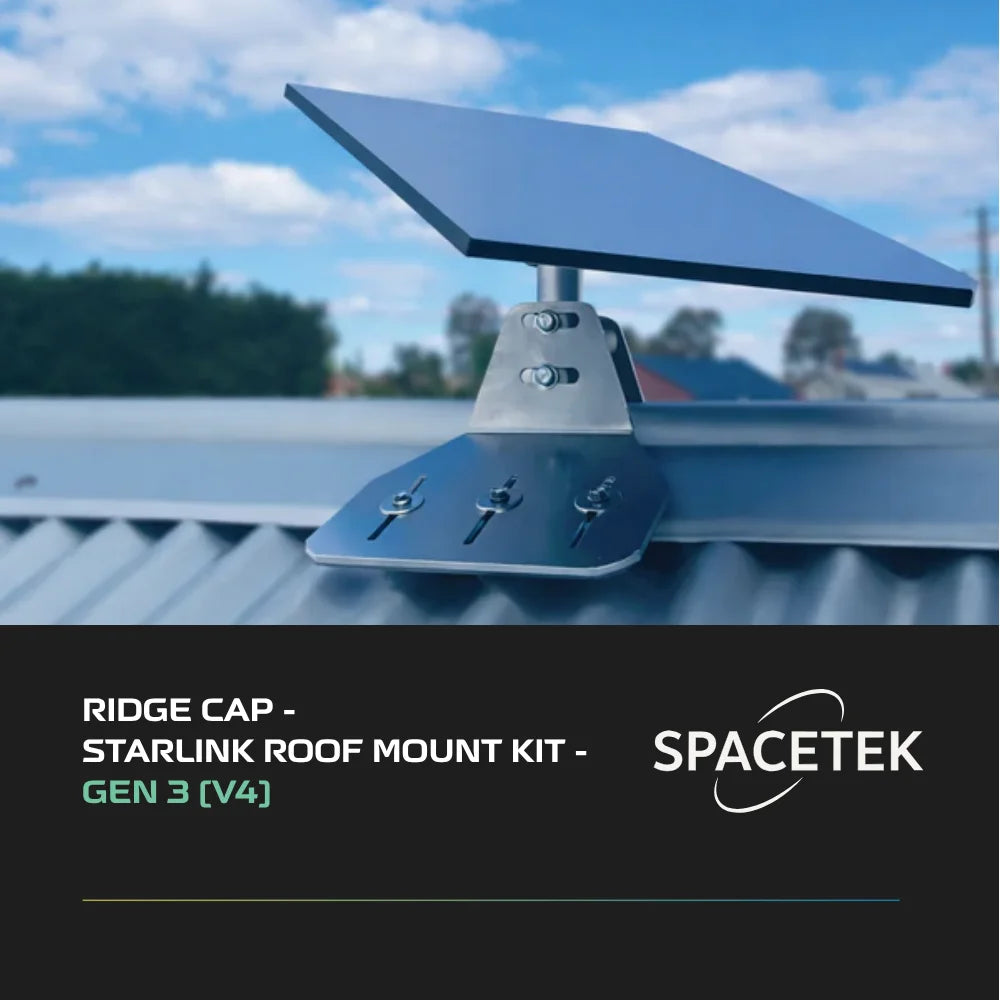
Using a heavy-duty, structurally sound mounting kit ensures your dish remains completely stationary during severe gales. For homes with metal roofs, the SpaceTek Tin Roof Mount Kit for Gen 3 V4 provides a rock-solid, professional-grade foundation. Unlike cheap alternatives, SpaceTek components are crafted from precision-machined or folded aluminium, and are absolutely not 3D printed. This ensures they handle the harshest New Zealand coastal winds without flexing, keeping your signal perfectly aligned when you need it most.
Weather-Resistant Accessories That Make a Difference
Protecting your cabling and connection ports is just as critical as securing the dish itself. Water ingress into the ethernet or power ports can cause short circuits, permanently ruining your expensive Starlink hardware.
Using weather-rated adapters and protective accessories prevents water from reaching sensitive electrical contacts. For pole-mounted setups, the SpaceTek Gen 3 V4 Pole Adapter provides a secure, weatherproof connection interface that prevents water from pooling inside the mounting pole. This component is also precision-machined from high-grade aluminium rather than being 3D printed, ensuring maximum durability and weather resistance.
Professional Installation vs DIY Setups
While Starlink is marketed as a DIY-friendly system, installing the dish in storm-prone or high-wind areas requires careful planning. A professional installer or an experienced DIYer using the right tools will perform a thorough obstruction analysis to ensure the dish has an entirely clear field of view.
When installing the system, you must ensure that:
- The mount is anchored directly into the structural timber or steel of the roof, not just the thin roof sheet.
- All cable entry points are sealed with high-grade, UV-resistant silicone to prevent leaks.
- The cables are routed with drip loops to prevent rainwater from running down the cord directly into the connection ports.
Prepare Your Starlink Installation for Harsh Weather
Bad-weather reliability starts with a stable mount, protected cabling and hardware suited to your Starlink model. Before buying replacement parts, confirm the issue is physical rather than a Starlink service outage or account problem.
- Dish movement or wind vibration: compare Starlink roof, wall and pole mounts for a more stable installation.
- Starlink Standard (Gen 3 / V4): browse Gen 3 / V4 mounts and accessories matched to this dish model.
- Damaged or weather-exposed cabling: check Starlink cables and connection accessories before reinstalling.
Tips to Maintain and Protect Your Starlink System Before and During Storm Season
Taking a proactive approach to maintaining your Starlink hardware will prevent costly damage and ensure maximum uptime when severe weather hits. By following a simple seasonal maintenance routine, you can protect your equipment from water damage, wind misalignment, and electrical surges.
Before Storm Season
The best time to prepare for a storm is before the clouds roll in. We recommend performing a physical inspection of your setup at least twice a year:
- Inspect the mounting hardware: Ensure all bolts, brackets, and clamps are tight and free from rust or corrosion.
- Check the cabling: Look for signs of wear, UV damage, or animal chewing on all exposed outdoor cables.
- Clear growing obstructions: Trim back any tree branches that have grown into the dish's field of view over the past few months.
- Install electrical protection: Ensure your router and power supply are plugged into a high-quality surge protector to guard against lightning strikes.
During Severe Weather Events
When a severe storm, cyclone, or bushfire threatens your area, safety should always be your primary concern. Follow these steps to protect your system:
- Unplug the power supply: If a severe electrical storm is directly overhead, unplug the router from the wall to prevent damage from power surges.
- Do not handle outdoor equipment: Never attempt to adjust, climb near, or relocate your dish while it is actively raining or during high winds.
- Protect exposed cables: If you have temporarily disconnected your dish and left the cable outside, wrap the connector ends in waterproof plastic to keep them dry.
After the Storm
Once the weather clears, take a few minutes to inspect your system and ensure everything is operating correctly:
- Check for physical damage: Look for any impact marks from hail or flying debris on the face of the dish.
- Verify cable connections: Ensure all plugs are still firmly seated and that no water has worked its way into the ports.
- Reboot the system: If your internet connection seems sluggish or unstable after a storm, perform a full power cycle of your router.
- Inspect the mount: Ensure the dish has not been physically shifted out of alignment by strong winds.
If you experience persistent connectivity issues after a major storm, consult our Starlink Troubleshooting Guide to diagnose signal issues.
Does Starlink Work Without Electricity?
No, Starlink cannot work without a continuous electrical power supply. The satellite dish and the WiFi router both require electricity to operate, meaning that if a severe storm knocks out your local mains power grid, your internet connection will go offline immediately.

To keep your internet active during a power outage, you must run the system off a backup generator, a portable power station, or a dedicated DC battery setup. Running your system directly on DC battery power is highly efficient for off-grid properties, caravans, and emergency backup setups because it eliminates the power loss caused by running an AC inverter.
For a seamless, professional off-grid power setup, the SpaceTek StarPower V4 Ultimate Power Solution allows you to run your Starlink system directly from a battery bank. This unit features a robust enclosure crafted from precision-machined aluminium, ensuring it is highly durable and not 3D printed. It provides the stable regulated DC input required by portable setups like the Starlink Mini, keeping your power consumption minimal and ensuring your critical communication lines stay online for days during extended grid blackouts.
So, Will Starlink Leave You in the Dark?
Starlink is an incredibly resilient satellite internet system that will easily keep you connected through the vast majority of bad weather events. While extreme tropical downpours can cause brief, minor slowdowns or short dropouts, the system's ability to automatically reroute signals via low-Earth orbit satellites ensures that total, long-term outages are incredibly rare.
However, the ultimate reliability of your system does not depend on the satellites in space — it depends on the hardware securing your dish to the roof. A cheap, flimsy mount will flex in the wind, ruining your signal and potentially damaging your home.
If you want your internet to stay rock-solid when the weather gets rough, you need to do it properly the first time. Invest once, install right. By pairing your system with a heavy-duty, New Zealand-engineered mounting solution from SpaceTek, you can rest easy knowing your connection will remain rock-solid through the worst of the storm season.
FAQ – Starlink Weather Performance
Does Starlink work in heavy rain?
Yes, Starlink continues to function during heavy rain, though you may experience a temporary reduction in speeds during intense downpours. Extreme tropical downpours can cause brief signal dropouts lasting from a few seconds to a minute, but the system recovers automatically as soon as the heaviest rain band passes.
Does Starlink work in snow?
Yes, Starlink is fully equipped to handle snow and freezing conditions. The dish features an automatic heating mode that detects cold temperatures and melts standing snow directly off the face of the receiver. This feature increases the unit's power draw while active to keep the signal clear.
Does Starlink work during thunderstorms?
Yes, Starlink continues to operate during thunderstorms, though dense clouds and heavy rain can cause minor latency spikes. To protect your hardware from the electrical risks associated with severe lightning storms, we highly recommend plugging your router into a high-quality surge protector.
Does Starlink work in hurricanes or strong winds?
Yes, the hardware is engineered to withstand high winds when properly secured. However, a highly secure, professional-grade mount is required to prevent the dish from vibrating or shifting, which causes signal loss. In catastrophic wind events, we recommend temporarily stowing and bringing the dish indoors to prevent physical damage from flying debris.
Does cloudy weather affect Starlink?
No, standard cloud cover has a negligible impact on Starlink's performance. The radio frequencies used by the low-Earth orbit satellites easily penetrate regular clouds without any noticeable loss in speed or increase in latency.
Does Starlink work without electricity?
No, the Starlink dish and router require a continuous power source to function. If your home loses mains power during a storm, the system will go offline. You can keep your system running during an outage by connecting it to a generator, portable power station, or a dedicated DC battery system.

Leave a comment
This site is protected by hCaptcha and the hCaptcha Privacy Policy and Terms of Service apply.