
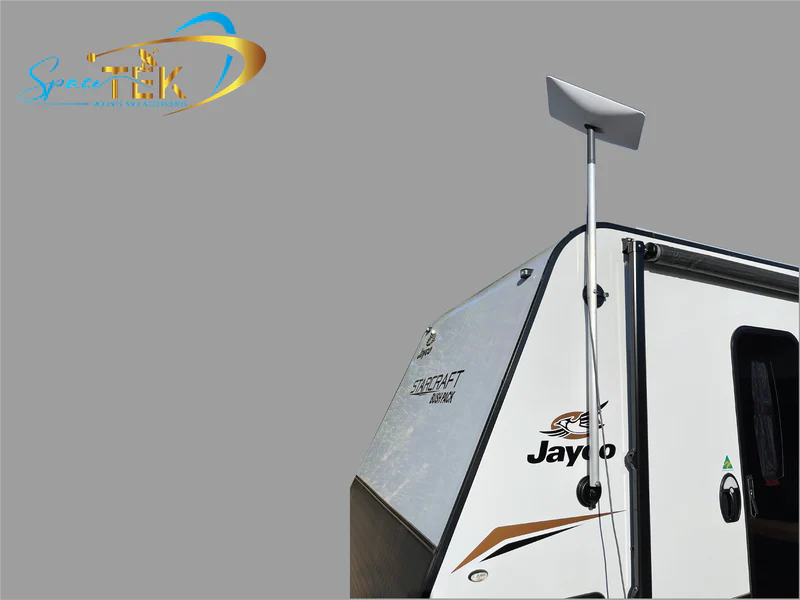
A weatherproof Starlink RV setup starts with a secure dish mount, sealed cable entry and tidy drip loops. With the right hardware, your connection is better prepared for corrugated roads, coastal spray, summer heat and a proper downpour.
Key Takeaways
- Use a low-profile, precision-machined aluminium dish mount that spreads load across roof ribs or rack tracks.
- Seal every cable entry point with a dedicated bulkhead instead of running cables through windows or doors.
- Add drip loops and strain relief so rainwater and vibration do not pull on cable connections.
- Keep power equipment raised, dry and ventilated inside storage bays.
- Explore Starlink Mounts for Caravans when choosing hardware built for Australian touring conditions.
How Can You Secure a Roof-Mounted Starlink Dish for the Road?
For a roof-mounted dish, the goal is simple: keep the setup low, secure and watertight. If the dish can move around, road vibration can put unnecessary strain on both the mounting hardware and your caravan roof.
For a secure roof installation:
- Use marine-grade fasteners with aluminium Starlink mounts to help limit rust streaks and galvanic corrosion.
- Keep the dish mount low-profile when travelling to reduce wind resistance and stress on roof fittings.
- Spread the load across structural roof ribs or dedicated rack tracks rather than unsupported roof skin.
How Do You Protect the Dish Cable Connection from Harsh Weather?
The connection port beneath the dish is designed for outdoor exposure, but touring adds bulldust, driving rain and constant movement that a fixed home installation does not face.
To protect the dish connection:
- Check that the factory rubber seal sits evenly in the Starlink cable socket before latching the connector.
- Form a drip loop by letting the cable dip below the connection point before securing it along the dish mount. Water can then fall away at the lowest point instead of tracking into the plug.
- Add strain relief along the aluminium dish mount so wind movement cannot tug directly on the port.
How Do You Route and Seal Cable Entry Points Without Compromising Your RV?
Getting the satellite cable from the roof or ground into your living area without inviting in rain, red outback dust or insects is one of the most important parts of the installation. Running a cable through a window seal or door rubber can lead to water leaks and damaged wiring.
A dedicated pass-through gives you a cleaner, more reliable result. Installing a Gen 3 Waterproof Bulkhead helps keep the caravan sealed while giving you a practical external connection point for the satellite cable.
Is a Waterproof Bulkhead Better Than Running the Cable Through a Window?
Running a cable through a cracked window or door seal may seem handy for a quick weekend away, but it can let in draughts, dust and water. A dedicated IP68 waterproof bulkhead keeps the connection outside, helps keep fine outback silt and insects out, and avoids pinching the Starlink cable in door or window seals.
For regular touring, it is best to avoid temporary window or door runs. They can distort factory seals, leave loose cable around the living area and allow water to track into the van during heavy rain.
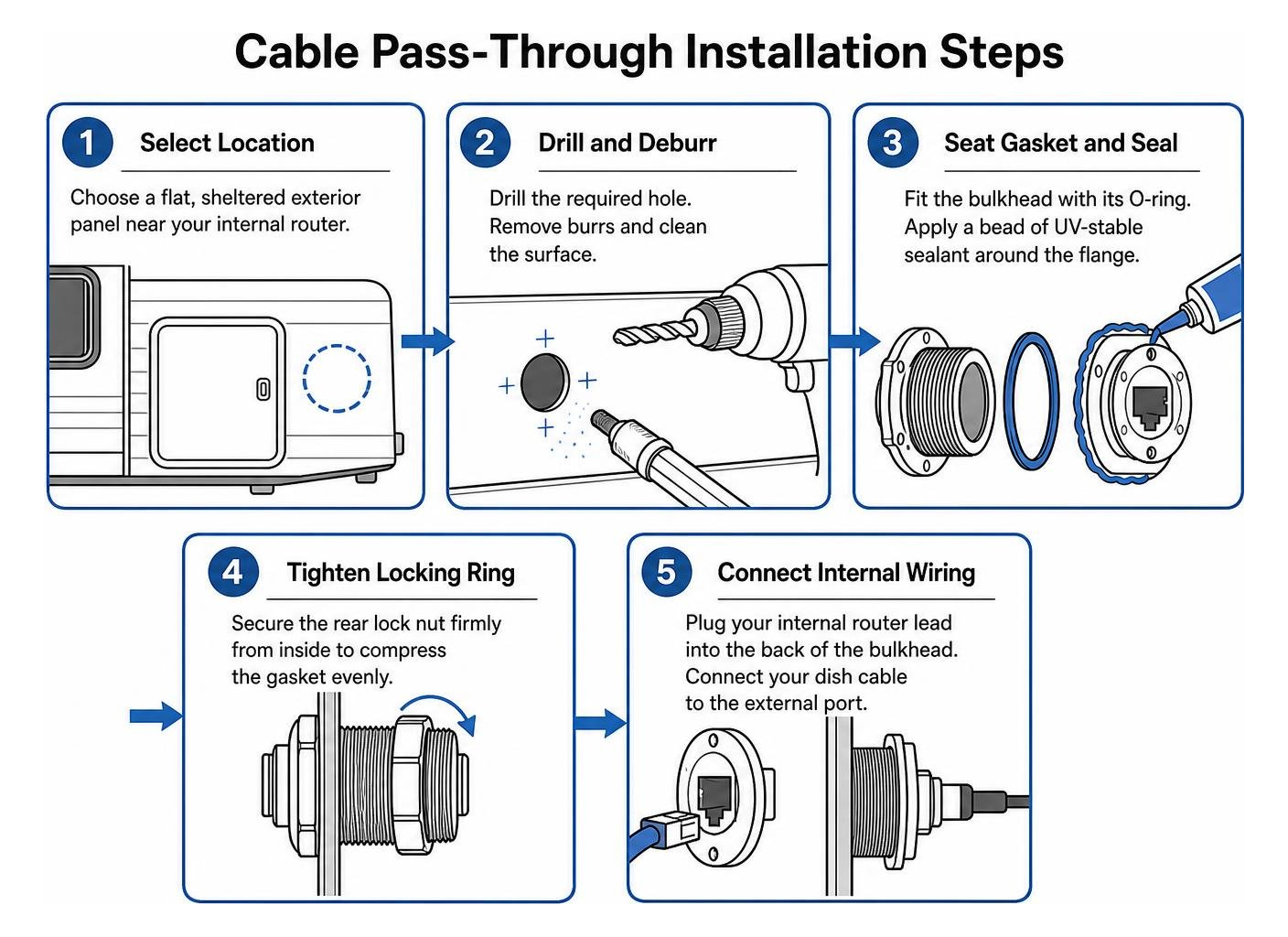
How Do You Install an IP68 Weatherproof Pass-Through?
You can install a dedicated bulkhead pass-through with standard tools:
- Choose a flat, sheltered exterior panel, such as a side battery locker, skirt panel or service compartment near the internal router.
- Drill the required hole through the outer skin, remove metal burrs and clean the surrounding surface with isopropyl alcohol.
- Fit the bulkhead with its compression rubber O-ring, then apply UV-stable sealant around the flange for extra weather protection.
- Tighten the rear locking ring from inside the panel until the gasket is evenly compressed.
- Connect the internal router lead to the rear of the bulkhead. Outside, connect the dish cable to the external port or use an IP68 Dust and Waterproof Coupler when you need extra cable length.
How Can You Protect Power Supplies and Hardware in Storage Bays?
Putting network hardware in an external storage bay can keep the caravan tidy, but these compartments can get dusty, damp and hot. A little planning helps keep your gear reliable over long Australian trips.
To look after your internal hardware:
- Raise routers and power gear off the compartment floor so condensation or unexpected water cannot pool around them.
- Keep storage bays ventilated, or mount equipment on a vertical divider to help manage heat on hot summer afternoons.
- Use sensible moisture control in enclosed bays, especially when travelling through humid tropical areas.
Why Is Direct DC-to-DC Power a Better Fit Than an Inverter?
A traditional AC inverter adds extra conversion stages to a mobile power setup. That can mean more standby draw and heat in an enclosed storage bay, which is not ideal when you are relying on caravan or RV battery power.
SpaceTek StarPower V2 and V3 DC power supplies are designed for mobile Starlink setups because they run directly from your battery system. Direct DC-to-DC power is more efficient than using an AC inverter, can reduce overall draw and can support custom setups that bypass the Starlink router where that suits your network design. For off-grid touring, it is a cleaner, simpler way to power Starlink hardware.
How Should You Manage Power Connections in Wet Campgrounds?
If power leads or electrical connections are sitting in wet grass, mud or pooling water, treat the situation as a serious safety risk.
- Keep plug joins clear of places where puddles can form, and follow the relevant Australian electrical safety requirements for outdoor use.
- Route cables away from vehicle tyres, sharp edges and busy walkways.
- Form drip loops on power lines before they enter power boxes or lockers so rain cannot run directly into the socket.
How Can You Weatherproof a Portable Dish and Prepare for Winter?
A roof mount is handy for a quick setup, but dense tree cover can mean you need to place the dish on the ground away from the caravan. In remote camps, Maintaining Satellite Reliability in Heavy Rain comes down to sensible placement, secure mounting and good cable management.
How Do You Weatherproof a Portable Starlink RV Setup Away from Obstructions?
When you need to place the dish away from the caravan:
- Keep the dish above standing water. Avoid ground depressions where runoff or puddles can reach the base, and use a suitable Starlink mount to keep connection points clear of dirt and water.
- Secure the dish against strong gusts. A portable dish can catch the wind, so use the mounting method intended for your setup to help prevent tipping and damage.
- Run cables along high ground, away from camp foot traffic, vehicle tyres and runoff channels. Check that the cable cannot snag or sit in moving water.
How Can You Keep Your Connection Stable in Freezing Conditions?
Freezing rain, alpine frost and snow can create a few extra challenges:
- Modern dishes can use built-in heating controls to respond when ice affects the signal.
- Avoid sharply bending satellite cables in sub-zero conditions, as cold cable jackets can become less flexible.
- Pack the dish and SpaceTek dish mounts dry where practical, and avoid trapping moisture around the hardware after a wet or frosty pack-down.
Frequently Asked Questions About Weatherproofing Starlink for Australian Touring
How do I protect the Starlink router in an exterior storage bay?
Mount the router inside the bay where it stays off the floor and away from possible condensation or pooled water. Leave enough passive ventilation to manage heat, while keeping door seals intact to block outback dust.
Can Starlink dishes handle severe storms and heavy rain?
The dish is designed for harsh weather, although very dense storm clouds can cause brief signal loss, often called rain fade. Clean cable connections, a secure dish mount and an unobstructed sky view give the system the best chance to reconnect as the weather passes.
What is the most reliable way to seal roof penetrations on an RV?
Use a mechanical cable-entry housing with non-hardening, UV-stabilised lap sealant. Secure the entry plate, then cover the screw heads and flange edges thoroughly to create a flexible barrier against water and road vibration.
Get Your Starlink Setup Ready for Australian Conditions
A dependable, weatherproof Starlink setup can help you stay connected from red-dirt tracks to tropical coastlines. Secure dish mounts, sealed cable entries and direct DC-to-DC power make it easier to protect your gear from vibration, rain, dust and everyday touring wear.
Ready to upgrade your off-grid touring setup? SpaceTek Australia makes rugged, precision-engineered gear for life on the road. Explore Durable RV Mounting Accessories to find practical options for keeping your connection secure on the move.


Leave a comment
This site is protected by hCaptcha and the hCaptcha Privacy Policy and Terms of Service apply.