
Why Getting Starlink Dishy Alignment Right Makes All the Difference
To achieve successful Starlink Dishy alignment, you need a stable, level mounting point and a clear, obstruction-free view of the sky so the Starlink dish can automatically orient itself and maintain connection with the Starlink satellite network. Unlike a traditional satellite TV dish, Starlink Dishy is not manually aimed at one fixed geostationary satellite. It uses phased-array antenna technology and built-in motors or electronic beam steering, depending on the model, to find and track satellites overhead.
Here's a quick overview of how to align a Starlink Dishy:
- Check for obstructions — Use the Starlink app to scan the sky and confirm the dish has a wide, clear field of view.
- Choose a solid mounting point — Select a roof, pole, caravan, or vehicle mount that will not flex, twist, or vibrate in wind.
- Level and secure the mount — Make sure the base or mast is stable and close to level before installing the dish.
- Let Dishy self-align — Power on the Starlink system and allow the dish to move or calibrate without forcing it by hand.
- Verify performance in the app — Use the Starlink app to check obstruction data, network statistics, and connection stability before locking in the final cable route.
For Australians in remote areas, a reliable Starlink signal is not a luxury — it is a lifeline for work, communication, and staying connected in regions where other internet options simply do not exist. Whether you are setting up a fixed home installation or a portable rig for life on the road, the key is not hand-pointing Dishy like an old satellite TV antenna. The key is giving it the right mounting position, a clear sky view, and hardware that keeps it steady in harsh weather.
What Actually Matters for Starlink Dishy Alignment?
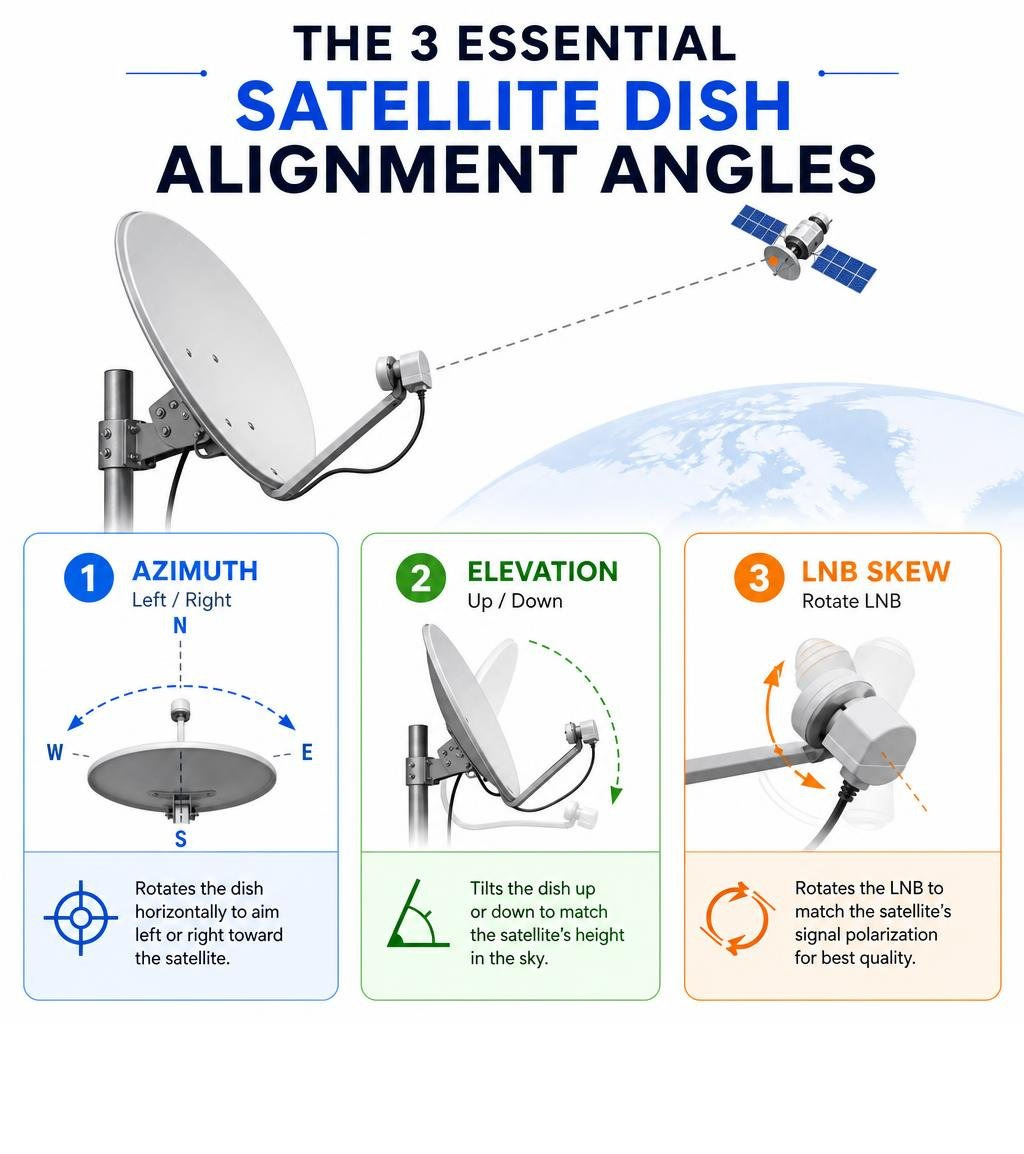
For Starlink Dishy alignment, the old azimuth, elevation, and LNB skew method does not apply in the same way it does for a conventional satellite TV dish. Starlink is designed as a self-aligning user terminal. Your job is to install it in the right place, mount it securely, and let the system do the aiming.
Instead of manually calculating compass angles, focus on these three Starlink-specific requirements.
Why Is Clear Sky View More Important Than Azimuth?
A traditional dish points at a fixed location in the sky. Starlink Dishy communicates with a moving constellation of low Earth orbit satellites, so it needs a broad, unobstructed view rather than one narrow compass bearing.
Trees, rooflines, sheds, awnings, chimneys, and even nearby masts can interrupt the link as satellites move overhead. That is why the Starlink app's obstruction checker is one of the most important alignment tools. Before drilling into a roof or setting up a caravan mount, use the app from the proposed mounting position and confirm that the sky view is suitable.
For a deeper Starlink-specific walkthrough, see our guide on How to Align Starlink Dish.
Why Does Mount Stability Matter So Much?
Because Dishy handles the aiming itself, the mount's job is to hold the terminal steady and correctly positioned. A flexible pole, loose roof bracket, or weak caravan mount can allow movement in wind, which can create dropouts even when the dish originally tested well.
For permanent installations, choose a mount that is corrosion-resistant, rigid, and suited to the surface you are attaching it to. For caravan, 4WD, or portable setups, choose a mount that can be set up quickly but still resists wobble, vibration, and accidental movement.
Do You Need to Set LNB Skew on Starlink Dishy?
No. Starlink Dishy does not use an external LNB that you rotate in a collar, so there is no LNB skew adjustment to set. You also do not need to fine-tune the dish by slowly sweeping left and right with a satellite finder meter.
If you are coming from older satellite TV equipment, this is the biggest difference: do not force Dishy into a manual angle. Install it securely, power it correctly, wait for it to calibrate, then use the Starlink app to confirm the final result.
Essential Tools for a Precise Starlink Dishy Setup
Before climbing onto your roof or setting up your camp rig, gathering the right tools will save you time and help prevent a weak or unsafe installation.
A successful Starlink Dishy setup may require:
- The Starlink App — Use it to check for obstructions, monitor setup progress, and review connection performance after installation.
- A Digital Level — Helpful for confirming that poles, brackets, and mounting surfaces are straight and stable.
- A Suitable SpaceTek Mount — Choose a roof, pole, wall, vehicle, or caravan mount that suits your Dishy generation and installation location.
- Wrench and Socket Set — Needed to tighten mounting hardware without over-stressing brackets or clamps.
- Cable Routing Supplies — Use clips, glands, grommets, conduit, and weatherproof routing where needed to protect the Starlink cable from rubbing, pinching, UV exposure, and water ingress.
- A Safe Ladder and Fall-Protection Plan — If the dish is being installed on a roof, make safety part of the setup rather than an afterthought.
You do not need a satellite finder meter, LNB skew scale, or coax signal meter for Starlink Dishy alignment. Those tools are for conventional satellite systems, not Starlink's self-aligning terminals.
How to Align Your Starlink Dishy in 5 Steps
Now that you understand what matters for Starlink, let's look at the step-by-step process for getting Dishy mounted, powered, and performing reliably.

Step 1: Pick the Clearest Practical Mounting Location
Start by checking the proposed mounting spot with the Starlink app. Look for a position with the widest possible view of the sky and minimal interference from trees, rooflines, sheds, nearby buildings, solar panels, antennas, or caravan accessories. If two positions look similar, choose the one that gives Dishy more open sky and allows a safer, cleaner cable route.
Step 2: Install a Stable, Level Mount
Dishy self-aligns, but it still needs a rigid foundation. Install your mast, roof bracket, wall bracket, caravan mount, or vehicle mount so it sits securely and does not flex under load. Use a level to confirm the mount is straight where the hardware requires it, then tighten the fasteners evenly. For the best physical foundation, choose heavy-duty, Australian-made Gen 3 V4 mounts and accessories built to withstand the elements without shifting.
Step 3: Seat Dishy Correctly and Route the Cable Safely
Insert the Starlink dish into the mount according to the hardware design, making sure it is fully seated and locked in place. Route the Starlink cable so it has strain relief, avoids sharp bends, and cannot be crushed by roof sheets, doors, hatches, awnings, or moving vehicle parts. A clean cable run protects performance and reduces the chance of intermittent faults later.
Step 4: Power On and Let Dishy Calibrate
Connect the Starlink router and power supply, then give Dishy time to initialise. Depending on your model, it may move physically or use electronic steering while it searches for satellites and optimises its connection. Do not try to force the dish by hand or manually sweep it across the sky like a traditional satellite TV dish.
Step 5: Check the Starlink App Before Final Tightening
Once the system is online, use the Starlink app to review obstruction data, network statistics, and connection stability. If the app reports regular obstructions or dropouts, test a better mounting position before permanently sealing penetrations or finalising the cable path. When performance looks stable, tighten all mounting hardware, secure the cable, and weatherproof any entry points.
Troubleshooting Common Starlink Dishy Signal Problems
If your Starlink Dishy is online but performing poorly, do not start twisting it by hand. Most Starlink alignment problems come down to placement, obstructions, mount movement, power, or cable issues.
- Obstructions — Trees, roof edges, sheds, poles, caravan accessories, and nearby structures can interrupt Starlink as satellites move across the sky. For detailed advice on identifying and bypassing these physical barriers, check out our guide on Tips to Navigate Around Dish Obstructions.
- Mount Movement — A dish that wobbles in wind or vibrates while mounted on a vehicle can create intermittent dropouts. Upgrade the bracket, shorten the unsupported pole length, or move to a more rigid mounting point.
- Cable Damage or Poor Routing — A pinched, kinked, stretched, or weather-damaged Starlink cable can cause connection problems that look like alignment issues. Inspect the full cable route and protect it from sharp edges, moving parts, and water ingress.
- Power Supply Problems — Portable and off-grid Starlink setups rely on clean, stable power. If your system is cycling, dropping offline, or behaving inconsistently, check the power supply, DC conversion setup, and all connectors.
- Temporary Weather Impact — Heavy rain and storms can still affect Starlink performance. A clear sky view and stable mount help reduce avoidable dropouts, but severe weather can cause temporary slowdowns.

Frequently Asked Questions About Starlink Dishy Alignment
How do alignment procedures differ for portable Starlink setups?
Portable setups, such as caravan, camping, and 4WD mounts, require you to check the sky view each time you change locations. The dish still self-aligns, but trees, cliffs, buildings, roof racks, awnings, and other campsite obstructions can affect performance.
Before settling in, place Dishy where the Starlink app shows the clearest sky view, then secure the mount so it cannot wobble or be bumped out of position. If you are travelling off-grid and want a compact setup, explore high-quality Starlink Mini portable accessories designed for fast, reliable deployment.
What indicates a successful Starlink Dishy connection?
Do not judge Starlink Dishy the same way you would judge a conventional satellite TV receiver. There is no LNB skew setting or manual signal meter peak to chase.
Instead, check the Starlink app. A successful setup should show the system online, minimal obstruction warnings, stable network statistics, and no recurring cable or hardware alerts. If you are seeing repeated dropouts, review the obstruction map first, then inspect mount stability, cable condition, and power quality.
Can I align Starlink Dishy without a professional meter?
Yes. A professional satellite meter is not required for Starlink Dishy. The Starlink app is the correct tool for checking obstructions, setup status, and connection performance.
If performance is poor, the solution is usually to improve the mounting location, remove obstructions where possible, secure the mount more rigidly, or fix cable and power issues — not to manually sweep the dish for azimuth.
Conclusion
Achieving reliable Starlink Dishy alignment is less about manually pointing a dish and more about giving Starlink the right conditions to do its job. Choose a clear sky view, install a rigid mount, route the cable safely, power the system correctly, and use the Starlink app to verify performance before making the installation permanent.
At SpaceTek Australia, we design and manufacture premium, heavy-duty Starlink mounts and accessories engineered specifically for harsh Australian conditions. Our products are precision-machined or folded from high-quality aluminium and reinforced composites — never 3D printed — ensuring your equipment stays locked in place through intense outback heat and wild coastal winds.
Ready to improve your Starlink Dishy setup? Start here:
- Need a rugged mount for a fixed installation? Explore SpaceTek Australia Starlink mounts and accessories built for secure, long-term Dishy alignment.
- Setting up Starlink for travel, camping, or off-grid use? Browse Starlink Mini portable accessories for compact, reliable deployment on the road.
- Not sure which Starlink Dishy setup is right for you? Contact the SpaceTek Australia team for practical advice on mounts, power, and installation options.


Leave a comment
This site is protected by hCaptcha and the hCaptcha Privacy Policy and Terms of Service apply.