

Is Starlink Latency in Australia Good Enough for Gaming, Work and Streaming?

Starlink latency in Australia typically sits around 25 to 30 milliseconds (ms), which is fast enough for video calls, online gaming, streaming, and most work-from-home setups.
According to Australian broadband performance data, this low-latency performance represents a massive upgrade for regional users, especially when compared to older satellite technologies. While premium fibre connections still lead with a latency of 5 to 15 ms, Starlink easily outperforms NBN Fixed Wireless at 30 to 60 ms, 5G home internet at 20 to 40 ms, and traditional NBN Sky Muster, which suffers from an unusable latency of over 600 ms.
For most regional Australians, choosing Starlink represents a dramatic improvement over older satellite internet. NBN Sky Muster averages over 660 ms latency (more than 20 times higher than Starlink), making real-time applications like video calls and gaming practically unusable on that service. To understand how this compares to other options, you can read about Starlink vs NBN to see which is better for regional areas.
This guide covers what Starlink's latency numbers actually mean in everyday life, what affects connection stability, and how to get the best performance out of your setup. Understanding how Starlink and weather interact can help you maintain a stable connection, while applying expert tips to Upgrade Your Starlink Experience will ensure you get the lowest possible ping whether you're gaming, working remotely, or streaming from a rural property.
What Does Latency Mean for Your Connection?
When we talk about internet performance, we often focus entirely on download speeds. While having a fat pipe to download large files is great, latency is what actually dictates how responsive your connection feels.
Simply put, latency is the time it takes for a packet of data to travel from your device to an internet server and back again. It is measured in milliseconds (ms), and in the gaming world, you probably know this as your "ping."
When you click a link, send a message, or move your character in an online game, that action is delayed by your latency. If your latency is high, you will experience a noticeable lag. This responsiveness bottleneck is a common issue, and understanding the root causes can help you identify Latency Problems with Satellite Internet before they impact your daily routines.
To put these numbers into context, here is how different latency ranges feel during everyday use:
- Under 20 ms (Excellent): Feels instantaneous. This is the gold standard, typical of urban fibre connections, and is perfect for competitive, esports.
- 20–50 ms (Very Good): Extremely responsive. You will not notice any delay during video calls, web browsing, or casual online gaming.
- 50–100 ms (Acceptable): Still fine for general web browsing, streaming, and working from home, but you might notice slight delays in multiplayer games.
- 100–200 ms (Poor): Video calls may start to stutter, and competitive gaming becomes frustrating as actions feel visibly delayed.
- Over 200 ms (Unusable for real-time tasks): Severe lag. Video calls will constantly overlap, and real-time gaming is completely out of the question.
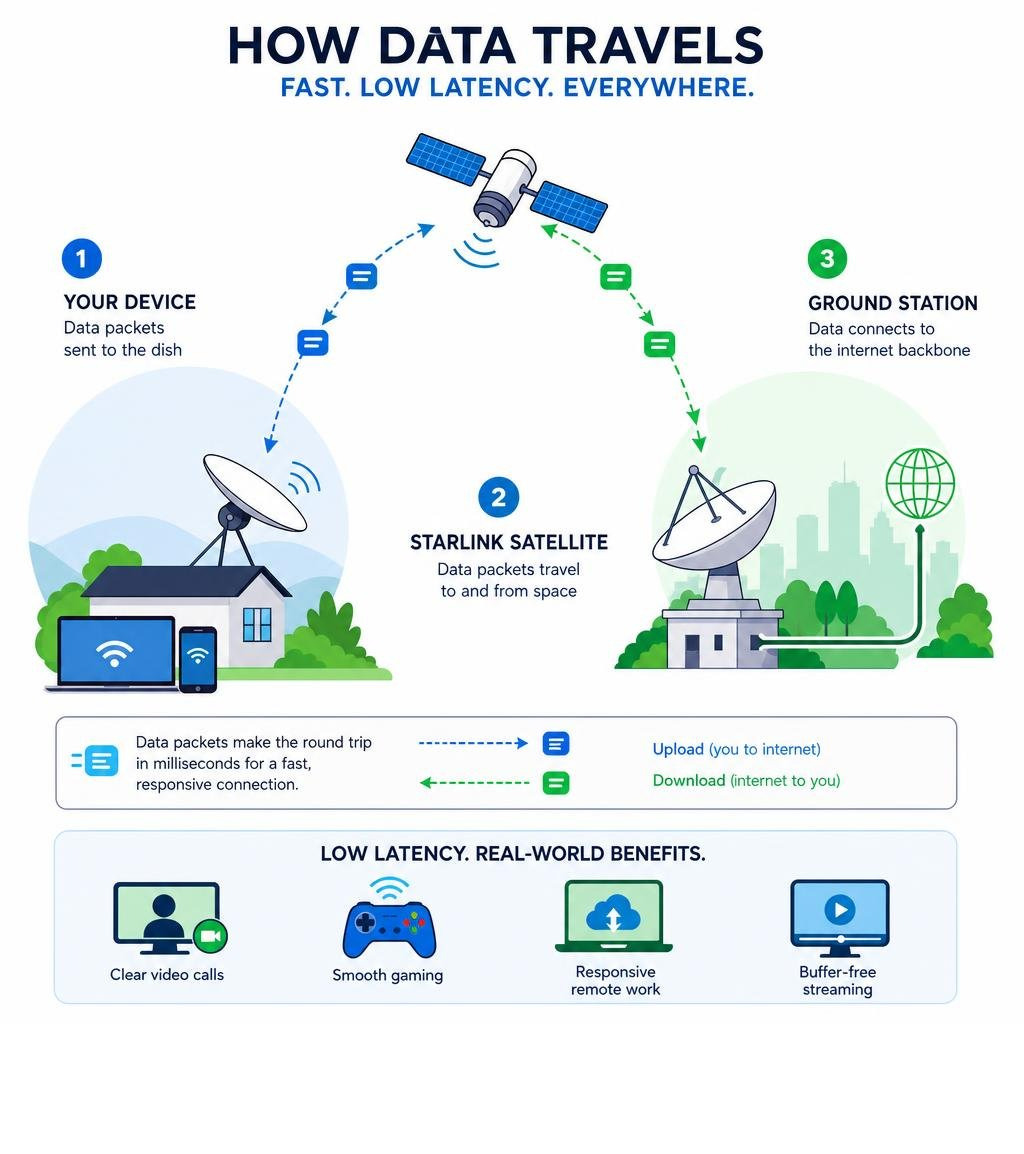
Is Starlink Latency Australia Low Enough for Everyday Use?
For the vast majority of Australian households, especially those in regional, rural, or remote areas, starlink latency australia is more than low enough for seamless everyday use. Whether you are running a business from a farm, studying online, or running a busy household with multiple devices, the low-latency nature of the service keeps everything moving smoothly.
How Starlink Latency Australia Impacts Online Gaming
If you are looking at Starlink gaming Australia performance, the short answer is yes: you can absolutely play online games on Starlink. For years, regional gamers were locked out of multiplayer lobbies because traditional satellite options made gaming impossible. Starlink has completely changed that dynamic.
In real-world testing across regional Victoria and New South Wales, players typically experience a stable ping of 25 to 50 ms when connecting to Australian game servers located in Sydney or Melbourne. This is perfectly adequate for popular multiplayer titles like Fortnite, Call of Duty, Valorant, and Rocket League.
However, there is one technical caveat to keep in mind: satellite handoffs. Because Starlink relies on a constellation of thousands of fast-moving satellites, your dish must regularly hand over its connection from one satellite to the next.
According to official ACCC reports, these handoffs can cause an average of 0.35 brief micro-outages per day. While these tiny drops of one to two seconds are completely invisible when you are streaming a movie or browsing the web, they can occasionally manifest as a sudden ping spike or a brief freeze in a competitive, online match. For casual and cooperative gaming, it is brilliant; for hardcore competitive esports players, it is a massive upgrade over older satellite tech, even if it does not quite match the absolute stability of fixed-line fibre.
Does Starlink Latency Australia Support Video Calls and Streaming?
When it comes to using Starlink for remote work, low latency is a complete game-changer. Older satellite services made video conferencing on platforms like Zoom, Microsoft Teams, and Google Meet incredibly awkward. The massive delay meant that people would constantly talk over one another, leading to frustrating, disjointed meetings.
With Starlink’s sub-30 ms latency, video calls are crisp, real-time, and completely natural. You can share your screen, participate in live workshops, and collaborate on cloud-based documents without any noticeable lag.
For streaming services like Netflix, YouTube, Stan, and Disney+, latency actually plays a very minor role once your video begins. Streaming platforms use "buffering," which pre-loads the video file a few seconds or minutes ahead of what you are currently watching. Because Starlink offers robust download speeds alongside its low latency, 4K and HD streams load almost instantly and play through without annoying interruptions.
Why Is Starlink Faster Than Traditional Satellite Internet?
To understand why Starlink is so much faster and more responsive than older satellite technologies, we have to look at basic physics and cosmic geography.
Traditional satellite internet services, such as NBN Sky Muster, rely on giant geostationary (GEO) satellites. These satellites are parked in a fixed position incredibly high up in space — roughly 36,000 kilometres above the Earth's surface. Because they are so far away, the radio signals have to travel a massive distance up to the satellite and back down again, twice for every single click. Even travelling at the speed of light, this physical distance introduces an unavoidable delay of at least 600 ms.
In contrast, Starlink uses a constellation of Low Earth Orbit (LEO) satellites. These satellites orbit just 550 kilometres above the Earth.
- Because they are roughly 65 times closer to the ground than GEO satellites, the physical distance the signal has to travel is drastically reduced.
- This massive reduction in distance is what slashes the round-trip time from over 600 ms down to a snappy 25–30 ms.
- This structural difference is why independent regulatory bodies have noted that Starlink represents a fundamental shift in regional connectivity.
If you are trying to decide which system is best for your property, you can read our detailed comparison on Starlink vs NBN: Which One's Better for Regional Australia to see how these technologies stack up across speed, reliability, and ease of installation.
What Factors Affect Your Starlink Connection Stability?
While Starlink is highly advanced, it is still a wireless satellite system operating in the real world. This means its performance, speed, and latency can be influenced by several external factors:
- Physical Obstructions: This is the single biggest cause of latency spikes and dropouts. If your dish does not have a completely clear, 360-degree view of the southern sky, objects like tree branches, roof gables, chimneys, or power lines will block the signal. Every time a satellite passes behind an obstruction, your connection drops momentarily, causing a massive ping spike.
- Weather Events: While Starlink is engineered to handle typical Australian weather, extreme downpours and severe thunderstorms can cause "rain fade." Heavy water droplets in the air can scatter the high-frequency radio signals, temporarily reducing speeds and increasing latency until the storm passes.
- Network Congestion: Just like any internet network, Starlink experiences peak usage times—typically between 7:00 PM and 11:00 PM. During these hours, when thousands of households are online simultaneously, download speeds can dip slightly, and latency may rise by a few milliseconds.
- Signal-to-Noise Ratio (SNR): The clarity of the signal between your dish and the satellites in space dictates how hard your system has to work to transmit data. To understand how signal quality directly impacts your connection's responsiveness and stability, check out our guide on Starlink SNR Explained: How Signal to Noise Ratio Affects Your Speed, Power Use & Reliability.
Field studies, such as the (PDF) Analysis of Low-Earth Orbit (LEO) Connectivity: Starlink Performance in Regional Australia (2025) paper, confirm that while environmental factors do play a role, maintaining a clear line of sight is the absolute key to keeping your latency low and stable.
How to Improve Your Starlink Performance and Minimise Lag
If you want to squeeze every last drop of performance out of your satellite connection and keep your latency as low as possible, there are several practical steps you can take.
Getting your physical setup right is the most effective way to eliminate latency spikes. We have compiled a comprehensive resource on this topic in our Starlink Performance Complete Guide, but here are the key steps you should follow:
- Mount Your Dish High and Clear: Do not rely on the temporary ground stand if you have trees or nearby structures. Elevating your dish on your roof using high-quality, professional Starlink mounts is the best way to clear obstacles. At SpaceTek Australia, we manufacture premium, heavy-duty dish mounts from precision-machined and folded aluminium, designed specifically to withstand the harsh Australian climate without rusting or flexing.
- Eliminate Wi-Fi Overhead: Wi-Fi introduces its own latency and interference, especially in busy households. If you are gaming or working from home, connect your computer directly to the Starlink router using an Ethernet cable (using the official Starlink Ethernet adapter if required). This can shave 5 to 10 ms off your local latency and eliminate Wi-Fi-induced jitter.
- Route and Protect Your Cables: Ensure your cables are routed securely and protected from physical damage. Heavy winds can rub cables against sharp roof tiles, causing micro-fractures that degrade signal quality over time.
- Use the Starlink App's Obstruction Tool: Regularly check the obstruction map in the official Starlink app. Even a tiny red speck on the map represents a tree branch or roof line that is occasionally blocking a satellite, which will translate directly into a lag spike.
Conclusion and Frequently Asked Questions
For regional and remote Australians, Starlink has successfully bridged the digital divide. By delivering an average latency of 25–30 ms, it provides a highly responsive, modern internet connection that easily supports gaming, working from home, and high-definition streaming.
While it may not completely replace the raw speed of capital-city fibre, it is a massive, life-changing leap forward for those living outside the fixed-line NBN footprint.
If you are ready to upgrade your regional setup with secure, Australian-made mounting solutions engineered for our tough conditions, visit our Contact Us page to speak with our local team.
What is a good latency for gaming?
For casual online gaming, any latency under 100 ms is perfectly playable. For multiplayer games where split-second reactions matter, you should ideally aim for a ping under 50 ms. Starlink consistently delivers in this 25–50 ms sweet spot for most Australian users connecting to local servers.
Does Starlink work in bad weather?
Yes, Starlink is built to withstand extreme weather, including intense heat, frost, and heavy rain. While extremely severe storms or thick cloud cover can occasionally cause brief signal attenuation (temporary slowdowns or slight latency increases), the connection will automatically recover and return to full speed as the weather clears.
Is Starlink better than NBN Sky Muster?
Yes, Starlink is vastly superior to NBN Sky Muster in terms of both speed and latency. While Sky Muster is a budget-friendly option for basic web browsing and emailing, its high latency of over 660 ms makes it entirely unsuitable for modern, real-time applications. Starlink’s 25–30 ms latency makes your internet connection feel just like a standard city-based broadband line.



Leave a comment
This site is protected by hCaptcha and the hCaptcha Privacy Policy and Terms of Service apply.