

Get Online Anywhere: Your Starlink Mini Camping Setup Made Simple
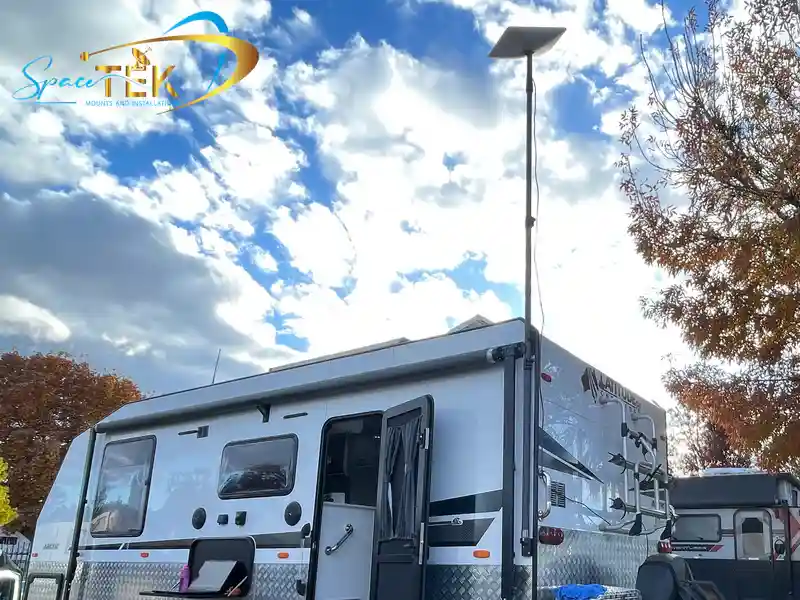
Setting up a starlink mini camping setup is the ultimate way to secure fast, reliable satellite internet anywhere in New Zealand by combining the compact Starlink Mini dish with a portable power source and a secure mount. This setup completely eliminates the need for mobile coverage or unreliable caravan park Wi-Fi, allowing you to stay connected even in the most remote parts of the bush.
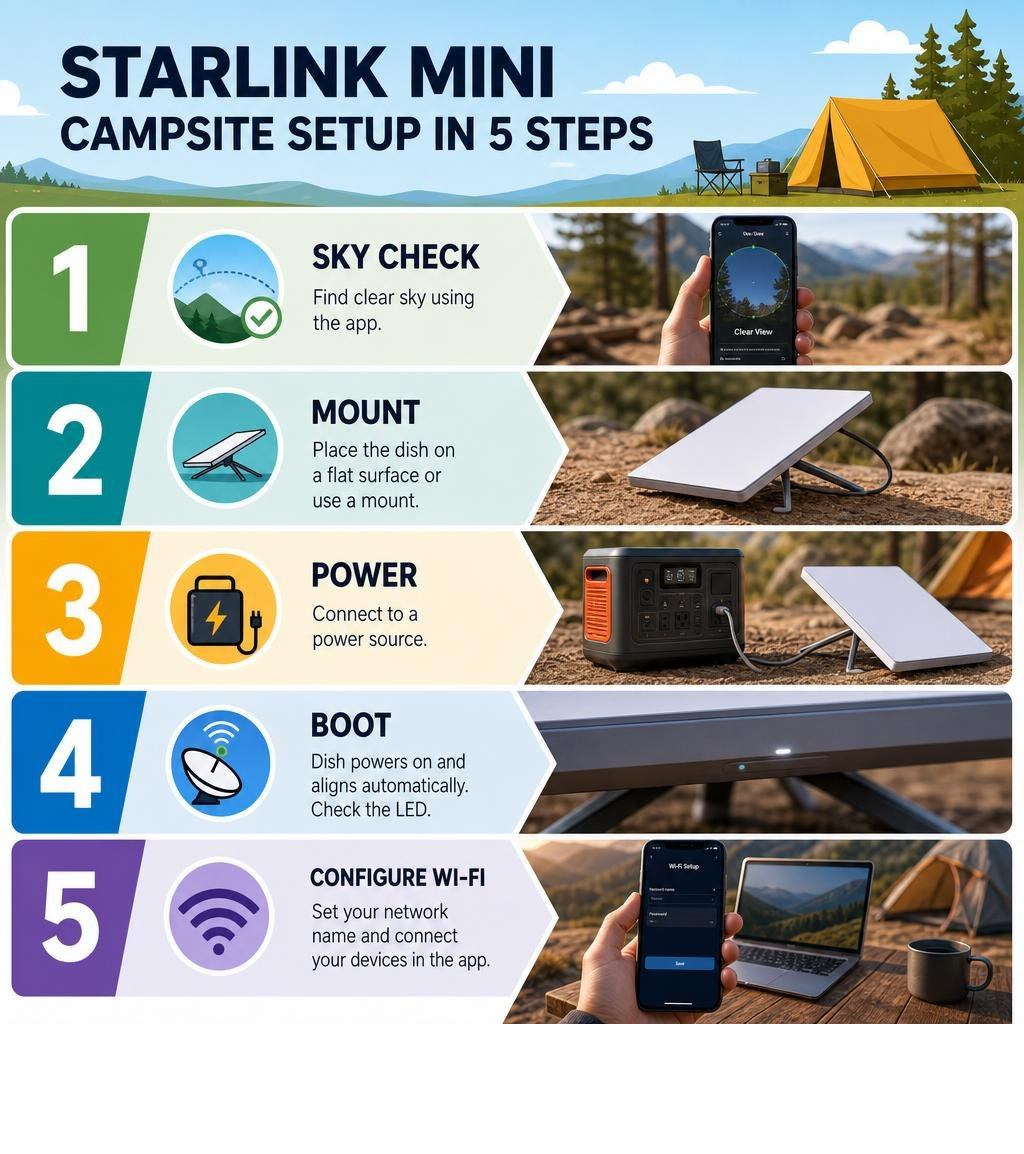
Here's how to get connected at camp in five steps:
- Find clear sky — use the Starlink app's obstruction finder to pick your spot
- Mount the dish — kickstand on a flat surface, or use a dedicated dish mount for elevation
- Connect power — plug into a portable power station, 12V vehicle socket, or solar setup
- Boot and align — the dish acquires satellites automatically; watch the LED indicators
- Configure Wi-Fi — set your network name and connect your devices via the Starlink app
If you're living or working remotely across New Zealand, staying connected in the outback has historically meant patchy mobile coverage and slow, unreliable workarounds. The Starlink Mini changes that completely.
At just 2.43 lbs and roughly the size of a laptop, it's the most packable dish Starlink makes. It draws a highly efficient amount of power on average, meaning a modest portable power station can keep you online for a full evening — or longer with solar. And because the dish has a built-in Wi-Fi router, there's no separate router box to pack or power.
Whether you're pulling into a remote campsite in the Kimberley or setting up for a week of off-grid work in the Snowy Mountains, the setup process is straightforward enough to do in under five minutes once you know the steps.
This guide walks you through exactly that — from finding the right spot to configuring your connection — so you can spend less time troubleshooting and more time enjoying the outdoors.
Relevant articles related to starlink mini camping setup:
- Read our comprehensive guide on how to setup starlink mini for more details.
Why the Starlink Mini is the Ultimate Camping Companion
When it comes to off-grid travel, weight, space, and power efficiency are everything. If you are packing up a 4WD, caravan, or camper trailer, every square centimetre of storage space matters. That is where the Starlink Mini shines as the ultimate portable internet solution.
Traditional satellite setups were heavy, power-hungry, and required complex wiring. The Starlink Mini changes the game entirely by packing high-speed internet hardware into a light, compact footprint that fits easily into a standard backpack. Whether you are a weekend warrior or a full-time digital nomad, this compact unit makes it easier than ever to bring high-speed internet into the deep outback.
For a detailed look at how this hardware shifts the camping landscape, read the Starlink Mini for Camping: Power, Mounts & Setup | Starlink RV Kit guide.
Why the Starlink Mini Camping Setup Beats Larger Dishes
If you have ever used a standard Gen 2 or Gen 3 Starlink dish, you know they are incredibly capable but also quite bulky. The larger dishes require a separate, power-hungry Wi-Fi router, a bundle of thick cables, and a solid physical footprint in your vehicle.
The Starlink Mini simplifies your travel kit on several fronts:
- Incredible Packability: Weighing just 2.43 lbs (approx. 1.1 kg), the Mini is roughly the size of a 13-inch laptop. It slides easily into a storage drawer or a backpack.
- Integrated Wi-Fi 5 Router: The router is built directly into the back of the dish itself. This means you do not have to find space or power for a separate router box inside your tent, canopy, or caravan.
- Reduced Power Consumption: Sipping roughly half the power of its larger siblings, the Mini runs comfortably off small portable batteries and direct DC setups.
- Simpler Cable Runs: With fewer components, you only need to run a single power line to the dish to get your entire campsite connected.
How to Set Up Your Starlink Mini Camping Setup in 5 Steps
Setting up your dish should not take all afternoon. Once you have arrived at your campsite, you can get your starlink mini camping setup online in five straightforward steps. For a complete look at the gear available to streamline this process, check out our SpaceTek Starlink Mini collection.
Step 1: Find a Clear View of the Sky
Because Starlink relies on a constellation of low-Earth orbit (LEO) satellites moving rapidly across the sky, your dish needs an unobstructed line of sight to the heavens.
Before you unpack your gear, open the Starlink app on your phone and use the built-in obstruction finder tool. Stand in your proposed setup location and point your phone’s camera upward to scan the sky. The app will highlight any trees, branches, or camp structures that might block the signal.
Even a single overhanging branch can cause intermittent dropouts or latency spikes, which can disrupt video calls or streaming. If you are camping in a heavily wooded area, look for clearings, riverbanks, or elevated positions to place your dish.
Step 2: Choose Your Mounting Option
Once you have identified a clear patch of sky, decide how to position your dish. The Starlink Mini comes with a built-in kickstand that is perfect for placing the unit directly on a camp table, a flat rock, or the roof of your vehicle in calm weather.
However, if the wind picks up or you need to elevate the dish to clear low-lying scrub, a dedicated mount is highly recommended. Elevating your dish by even a metre can make a massive difference in signal consistency. For a detailed breakdown of your options, consult our guide on Starlink Mini Mounting Options.
Step 3: Connect to a Reliable Power Source
With your dish positioned, run your power cable back to your power source. The Starlink Mini comes with a 15-metre DC power cable, giving you plenty of flexibility to place the dish in a sunny clearing while keeping your vehicle or tent in the shade.
You can power the Mini using a portable power station, a 12V vehicle socket, or a dedicated deep-cycle battery system. To learn more about the best ways to power your unit efficiently, refer to our comprehensive Starlink Mini Power Supply Guide.
Step 4: Boot Up and Align the Dish
Plug the power cable into the dish, ensuring the waterproof plug face sits flush with the port to maintain its IP67 weather protection.
The dish will take a minute or two to boot up and begin searching for satellites. Unlike older satellite systems that require manual pointing, the Starlink Mini uses an electronically steered phased-array antenna.
Open the Starlink app to access the alignment tool. If the dish needs to be rotated slightly for optimal signal acquisition, the app will guide you with clear on-screen prompts. Once aligned, tighten any thumbscrews on your mount to secure the dish in place.
Step 5: Configure Your Wi-Fi Settings
With the dish aligned and connected to the satellite constellation, open your phone's Wi-Fi settings and connect to the default "STARLINK" network.
Open the Starlink app to complete the initial configuration:
- Create a custom network name (SSID) and a secure password.
- Enable band steering if you want the dish to automatically manage the 2.4 GHz and 5 GHz bands for your devices.
- Run a speed test to verify your connection quality.
Once configured, the built-in router can support up to 128 devices, ensuring everyone at the campsite can stay connected.
How Do You Power a Starlink Mini Off-Grid?
Power management is one of the most critical aspects of off-grid camping. Because the Starlink Mini is designed for portability, its power requirements are highly optimised, drawing a very low amount of power during standard operation.
This low power draw makes it entirely feasible to run your internet setup off-grid without needing a noisy generator. To explore off-grid power strategies in depth, read How to Power Starlink Mini Off-Grid: Wiring, Batteries, Solar | Starlink RV Kit .
Direct DC-to-DC Power vs AC Inverters
Many campers make the mistake of plugging their Starlink Mini's standard AC wall adapter into a portable power station’s AC inverter. While this works, it is highly inefficient.
An inverter must convert your battery's DC power into AC, only for the Starlink power brick to convert it back down to DC power. This double conversion process wastes a significant portion of your battery’s energy as heat.
Because the Starlink Mini accepts a wide input voltage range through its barrel jack, running it directly on DC power is far more efficient. Using premium solutions like the StarPower V2 and V3 DC power supplies provides massive DC-to-DC efficiency advantages over AC inverters. By eliminating conversion losses entirely, StarPower V2 and V3 systems allow your batteries to run significantly longer, keeping you online without draining your power reserves.
Calculating Battery Runtime for Your Starlink Mini Camping Setup
To plan your power budget, you can estimate your runtime based on your battery capacity. Let's look at how long common battery capacities can typically run your Starlink Mini under standard operating conditions:
- Compact Power Station: This small, highly portable battery station can run the Mini for several hours, making it perfect for weekend trips where you only need internet in the mornings and evenings.
- Mid-Sized Power Station: A mid-sized battery bank can keep your dish powered for an extended period of continuous use, easily covering a full day or more of remote work.
- Large Basecamp Setup: If you are running a larger lithium battery system with solar input, you can run the Starlink Mini indefinitely. A standard solar panel setup can generate enough power during peak sunlight hours to run the dish and fully recharge your battery bank.
To stretch your battery life further, configure the "Sleep Mode" setting in the Starlink app to automatically power down the dish during the night when you are asleep.
What Are the Best Starlink Mounts for Campsites?
While the built-in kickstand is convenient for quick stops, camping in the diverse New Zealand climate often demands a more robust mounting solution. High winds, uneven terrain, and inquisitive local wildlife can easily tip over a dish left on the ground or a camp table.
When choosing Starlink mounts, look for durability and ease of use. At SpaceTek, our premium range of mounts is engineered specifically for coastal, rural and alpine New Zealand conditions. We construct our mounts using precision-machined or folded aluminium and reinforced composites — never 3D printed parts — ensuring your setup survives the roughest outback tracks.

Temporary Ground and Tabletop Mounts
If you prefer to keep your setup highly portable, temporary ground and tabletop mounts are ideal.
Using a ground plate or a weighted base provides excellent stability on sandy or uneven terrain where the basic kickstand might sink or tilt. Many portable mounts feature quick-release mechanisms, allowing you to deploy and stow your dish in seconds without needing any tools.
Vehicle and Roof Rack Mounts
For overlanders, caravaners, and van lifers, mounting your Starlink Mini directly to your vehicle is often the most convenient option. It keeps the dish off the ground, away from dust, mud, and water, and minimises setup time at each new campsite.
Some of the most popular vehicle mounting configurations include:
- Magnetic Roof Mounts: Heavy-duty magnetic setups, like our robust powder-coated in-motion magnetic roof mount for Starlink Mini, use powerful earth magnets to secure the dish to your vehicle's roof. This allows for quick installation and removal without drilling holes.
- Telescopic Pole Mounts: A carbon fibre telescopic RV mount for Starlink allows you to elevate your dish high above your caravan or vehicle roof rack, easily clearing nearby trees or obstacles to secure a perfect line of sight.
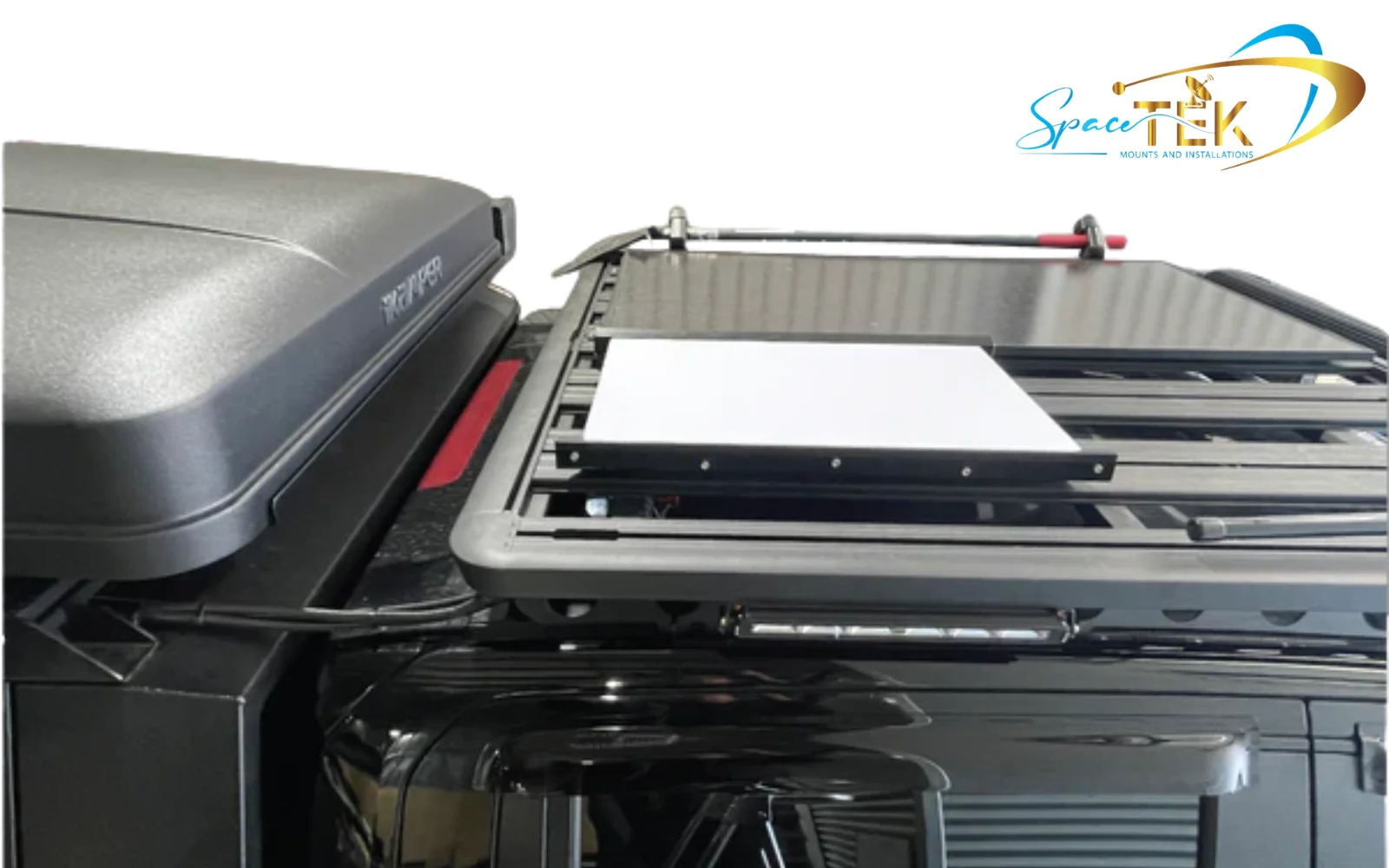
- Roof Rack Wing Supports: Designed to bolt directly onto popular roof rack channels, these slimline aluminium mounts keep your dish permanently or semi-permanently integrated into your vehicle's profile.
Frequently Asked Questions About Camping with Starlink Mini
Can I run Starlink Mini off a standard USB-C power bank?
Yes, but with some important caveats. The Starlink Mini can be powered via USB-C, but it requires a power bank that supports USB-C Power Delivery (PD) and can output sufficient voltage and wattage to meet the dish's power delivery requirements.
To connect a standard power bank, you will need a compatible USB-C to DC barrel trigger cable. While this is a highly portable option for backpacking or quick check-ins, keep in mind that generic USB-C power banks often experience higher energy conversion losses than a direct DC-to-DC connection from a dedicated battery system.
Does weather affect the Starlink Mini's performance?
The Starlink Mini is designed to handle tough outdoor environments, but extreme weather can impact its performance:
- Rain Fade: Light to moderate rain has negligible impact on your speeds. However, extremely heavy downpours can scatter the satellite signal, leading to temporary speed drops or brief outages.
- Extreme Heat: In temperatures above 40°C, the dish may throttle its speeds to prevent overheating. If you are camping in hot desert environments, try to position the dish where it can get some natural airflow underneath, and avoid placing it directly on hot metal surfaces like vehicle bonnets.
- Cold and Snow: The Mini features an automatic self-heating mode to melt snow and ice. While useful in alpine regions, this feature increases power draw significantly. If you are camping in warmer climates, make sure to disable this feature in the app settings to conserve battery power.
Can I use the Starlink Mini while my vehicle is in motion?
Yes, the Starlink Mini is capable of in-motion use, making it popular for keeping passengers connected or tracking routes while driving. However, to use the dish while moving legally and technically, you must be subscribed to a Starlink Roam plan that supports in-motion data.
For safe in-motion use, the dish must be mounted flat on your vehicle's roof using a low-profile, high-strength mount, such as our magnetic or roof rack systems, to ensure it can withstand highway wind speeds and vibrations.
Simple Setup, Serious Freedom
A starlink mini camping setup offers unprecedented freedom for New Zealand campers, travellers, and remote workers. By packing high-speed satellite internet into a compact, energy-efficient package, the Starlink Mini ensures you can stay connected, stream your favourite shows, or work from virtually anywhere in the country.
To get the most out of your portable setup, remember to:
- Always use the Starlink app's obstruction finder to secure a clear line of sight.
- Prioritise direct DC-to-DC power solutions to maximise your battery runtime.
- Invest in high-quality, weather-resistant Starlink mounts to keep your dish stable and elevated.
At SpaceTek New Zealand, we design and manufacture premium, heavy-duty Starlink mounts and DC power accessories engineered to withstand the harshest outback conditions. If you are ready to upgrade your off-grid internet setup with gear built for the road, explore our collections or contact us today to find the perfect mounting and power solution for your next adventure.



Leave a comment
This site is protected by hCaptcha and the hCaptcha Privacy Policy and Terms of Service apply.